# Let's code a Virtual DOM!
## What is the DOM?
DOM (Document Object Model) is a tree-like structure that holds information about how an HTML (or XML) page is structured. Each individual node in the tree represents an element on a web page.
In Javascript, DOM can be accessed and modified via `window.document` object.
Let's see how can we add an element to a webpage using DOM interface.
Let's assume the following HTML code:
```html
DOM
```
This template will be used throughout this post - we won't ever change it again 😌
To change the content of the page via DOM interface we can do the following:
```typescript
const app = document.querySelector('#app')!;
app.innerHTML = `
Hello from DOM
`;
```
First, we are grabbing an element with the id "app" from the DOM, and later we change the contents of this element, to contain an `h1` with a text in it.
The result isn't anything fancy.

It should work well for small apps, that do not update UI very often. However, if we plan to build a highly reactive site, there is a problem with this approach.
Operations on DOM are slow. Recreating the whole tree every time would be a waste of time and resources. If we'd like to build a highly reactive webpage, we need to look for another solution.
One approach would be to see which elements need to be updated by comparing old and new trees. That's exactly what Virtual DOM is aiming to do.
Let's see how can we build our own React 🔥
## Creating a virtual DOM
In the real DOM, there is a method `document.createElement` that creates a new node. For our virtual DOM, we also need such a method.
### `view` function
Let's create a function called `h` (it's a convention). The short name will come in handy later in the process 😉
```typescript
const h = (type: string, props: any = {}, children: any[] = []) => ({
type,
props,
children,
});
```
The `type` argument describes the type of the HTML element like `h1`, `div` and so on...
The `props` argument works exactly like props in React - it allows us to pass data (attributes) to the element (although we will not cover them in this episode).
And `children` is an array of other nodes that should be rendered inside the current element.
Let's see how it could be used:
```typescript
const view = () =>
h('div', {}, [
h('h1', {}, ['Hello']),
h('p', {}, ['from virtual DOM!']),
h('p', {}, ['from virtual DOM!']),
h('p', {}, ['from virtual DOM!']),
h('p', {}, ['from virtual DOM!']),
]);
```
We have created a `div` element with `h1` and `p` elements inside. Each of those elements has a text node as its children.
Now it's time to convert this virtual tree into actual DOM.
### `render` function
Let's implement a `render` function.
```typescript
const render = (root: HTMLElement, view: Function) => {
const rendered = view();
diff(root, null, rendered);
};
const diff = (
root: HTMLElement,
oldNode: any,
newNode: any,
index: number = 0
) => {
// check if the node has changed and update it if needed
};
render(app, view);
```
Render function evaluated the view function first, and then ran the diff function which takes a root element (from the real DOM), the old virtual value (since we render it for the first time it's `null`) and the new virtual value - the evaluated tree form the `view` function.
### `diff` function
Basically, the `diff` function will just compare oldNode with newNode and see if it needs to update the `root`.
Let's now see how can we implement the diff function.
```typescript
const diff = (
root: HTMLElement,
oldNode: any,
newNode: any,
index: number = 0
) => {
if (!oldNode) {
root.appendChild(createElement(newNode));
}
};
```
If `oldNode` is `null`, which means that this element is not present on the page, we need to create this element and insert it into DOM. First, we create an element using the `createElement` function, which we implement in a second, and then we use the `appendChild` method on a real DOM element, to append this node as its child.
Let's check how can we implement `createElement` function.
```typescript
const createElement = (node: any) => {
if (typeof node === 'string') {
return document.createTextNode(node);
}
const el = document.createElement(node.type);
node.children.map(createElement).forEach(el.appendChild.bind(el));
return el;
};
```
If a node is a Text Node (i.e. "Hello"), we just render it using `document.createTextNode` function.
If not, we create element of given type using `document.createElement` and then, loop over each of it's children, calling `createElement` function recursively. That way we have created the whole tree and returned it, so it can be appended by the `diff` function.
Let's see the complete code we have written until now:
```typescript
const app = document.querySelector('#app')!;
const h = (type: string, props: any = {}, children: any[] = []) => ({
type,
props,
children,
});
const view = () =>
h('div', {}, [
h('h1', {}, ['Hello']),
h('p', {}, ['from virtual DOM!']),
h('p', {}, ['from virtual DOM!']),
h('p', {}, ['from virtual DOM!']),
h('p', {}, ['from virtual DOM!']),
]);
const render = (root: HTMLElement, view: Function) => {
const rendered = view();
diff(root, null, rendered);
};
const createElement = (node: any) => {
if (typeof node === 'string') {
return document.createTextNode(node);
}
const el = document.createElement(node.type);
node.children.map(createElement).forEach(el.appendChild.bind(el));
return el;
};
const diff = (
root: HTMLElement,
oldNode: any,
newNode: any,
index: number = 0
) => {
if (!oldNode) {
root.appendChild(createElement(newNode));
}
};
render(app, view);
```
Now, in the browser we can check if our app is working - if we run this code we will see the following:
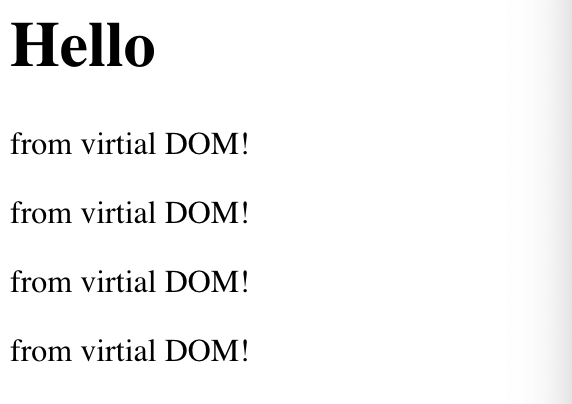
## Conclusion
Yay. Now using `view` and `h` functions we can build infinitely complex UI.
Of course, we haven't implemented state management yet, so we can't change anything in the DOM. And we are not passing any attributes to the DOM so we can't really style our app.
Those topics we'll cover in the future blog posts from this series.
Stay tuned for the next part 😊
[Interactive example on StackBlitz](https://stackblitz.com/edit/vitejs-vite-9tphin?file=src/main.ts)